Monday, April 15, 2013

Thing 7: Podcasting and Screencasting

This is the last Cool Tool for me. 

Audioboo is the easiest podcasting tool I've ever used.  You just download the app on your Smartphone and record.  I love the feature that provides you with a countdown (of 3) before it begins recording.  You then have the option to preview and re-record your message.   You can personalize your account an add a photo, notifications, location, etc.  to your profile.   It is a very handy tool for people who enjoy podcasting.   Also, you can search other people's "Boos" (podcasts), and surf podcast channels.  Your podcasts are all listed in the "My Boos" section and you can include contacts and receive messages.  All in all Audioboo is a cool tool indeed.

I left it purposely for the end because I don't particularly like to hear myself talk.  However, through Cool Tools I found the awesomest, if this can be counted as a word, app for podcasting. 

Listen to my podcast at

Thing 10: Productivity Tools

Just as our rooster friend is being productive by pouring a hot cup of coffee as a wake up call, so are all of the tools we've used so far.   As I finish this project I am left wondering how to integrate all of these great Web 2.0 tools into my lessons.  We don't have access to iPads, iPods, tablets or hand held devices in my library as learning devices, but I would still like for my students to be aware of the versatility of these devices.

Our Smartphones can be much more than just texting and gaming devices.  We can use apps that help us to safe guard our devices and information.  One such app is Lookout.  This is one of the apps I am using for my phone.  It backs up important data and protects my device form security breaches and loss.  I like the screaming feature that allows your device to scream if lost.  I also like the back up of my contacts.  One time our computer crashed and my daughter and I lost everything from our phones.  (We did not have any other form of back up for our mobile devices).  It was horrible for me trying to remember all of my contacts.  LOL

Another great tool is Dropbox.  I use it on my Smartphone to keep my documents and photos neatly tucked away.  It's free just like Lookout and provides you with 2 GBs of free storage.  I can't tell you how many times I've wanted to download a PDF and did not have a place to store it.   So awesome.
A handy tool for people who don't want walk around with external drives or don't have them.

The only complain I have is not being able to download any of these tools onto my district laptop.  (The school district won't allow it).  Such a shame, because many of these tools help keep me sane online.   Happy online travels :)

Sunday, April 14, 2013

Thing 9: Databases & Searches

Teaching students how to properly use search engines can be challenging.   Most people have become so used to Google, that it is difficult to use anything else.  However, for young students it is vital that they learn to properly use search engines.  The addition of "kid friendly" search engines is a great way of teaching searching skills without accidentaly accessing inappropriate material. 

One of the search engines I selected to explore was KidRex .   This search engine while geared to younger children is an excellent choice for kids of all ages.  I am going to begin using it with my students. 

Thing 8: Collaborating, Connecting, Sharing


The Internet provides many opportunities for collaborating, connecting and sharing.  Things that were not possible online a few years ago are available for us today. 
One of my favorite ways of collaborating and sharing is Google Docs.  (It now goes by the name Google Drive)

I have been using Google Docs for some years now and it helped me proof read my sister's college papers.  She has dyslexia and has always needed someone to look over her papers.   The way is works for us is that my sister sends me her completed writing and I read it and highlight letters and sentences that need to be corrected.  It is awesome to be able to edit while she corrects at the same time.   Using this tool has worked wonders for my sister's writing.  She has been able to write her college papers while gaining experience on using online technology tools.  Google Docs is an invaluable tool to assist my sister in working with her disability.   I have also used Google Docs for group projects in graduate school.  And it makes connecting and working with your fellow students, so easy.

In keeping with the themes of connecting and sharing, Diigo is one of my go-to tools.   I save important websites and research tools here while learning about new websites from other colleagues. 
These cool tools make collaborating, connecting, and sharing so much easier.

Monday, February 25, 2013

Thing: 6 Curation Tools

Curation tools were the one tools I didn't know fell into the category of Curation.   During my graduate studies I used Diigo all the time.  (I remember hearing about Delicious and thinking what the heck is that?).  Diigo is still my go-to for organizing references and great websites.

Diigo is a great resource for students because they can bookmark their research sources and "carry" them from computer to computer.  (Great for kids who tend to forget their flash drives).

For thing 6 I got hooked on Flipboard.  I downloaded it on my iPhone and the iPad.  What a cool tool!  Love how you can customize your own personal magazine.  I've added so many topics and I'm enjoying all of the things you can do on it.  It is simple to use and can help students and professionals who are "new" to tech tools.  Try it you will love it.

Sunday, February 24, 2013

Thing 5: Digital Storytelling & Presentation Tools

Wow!  I cannot believe it is almost the end of February.  The school year is just brezzing by.
For thing 5, I used Storybird.  My personal experience with digital storytelling and presentation tools goes back to a graduate education course I took on teaching technology to ESOL students.  Our class used VoiceThread as an online communications tool to "discuss" our topics.  I really enjoyed using it because it was like being in a classroom.  All of the students could "see" each other and leave video, audio or written comments for others to view, listen or read.    I am thinking of using VoiceThread for a small group that will be reading Flat Stanley.

Now back to Storybird.   I really enjoyed this digital storytelling tool.  And one of the best deals was that the story could be easily created on the iPad.  (Some of the other tools from thing 5 were not so great on the Apple device).  However, this tool could work great with students who love to use the iPad.   There is such a cozy feel to creating stories on Storybird, that I can easily see students sitting on a rug or pillow creating awesome stories.  I will definitely try this one with some of my techie second graders. 

Here is my digital story.  Enjoy!
Becky's Library Adventure

Look closely at Becky during her adventures.   The secret is the reason she giggles at the end of the story.  :)

Monday, January 21, 2013

Thing 4: Photo Sharing, Editing and Fun

Photo sharing is a favorite hobby of ours at home.  My kids and I love to make musical slideshows of the family's "growing cousins".  It's one thing to share home photos, but school photos are another thing.  Due to the privacy issues with students, we must be careful when using photo sharing apps.  However, witihin the school setting, there are many ways to benefit from photo sharing apps and websites.  We can create slideshows for presentations, assemblies, moving up ceremonies, etc.  I am currently working on a "Senior" slideshow for my daughter's class. 

On my Ipad I tried working with Aviary but didn't have the results that I wanted.  (I wanted to be able to do slideshows such as the ones you can do on Windows).  I am still playing with it as an App, but I like Muzy much better.

For my library students I am currently assembling photos for our "Get caught Reading" photo showcase.  Here are some of our photos I "pinned" on a corkboard using Muzy. 

Muzy  is great for making collages, posters, photo designs, etc.  It is fairly easy to use and can be shared on most social networks. 
Happy photo sharing!  :)
 

Tuesday, November 20, 2012

Thing #3: RSS

I've always had a difficult time catching up with tech tools that involve lots of comments or info.  It seems I want to read everything, but don't have the time.  That's how I came about signing up for google reader.  It kept all of my different sites organized so that I wouldn't miss any topics of interest.  
I knew there were similar "readers" like google's but had never tried them.  
For this course I tried Netvibes and I like it.  I am seriously considering it as my new homepage since iGoogle will soon be gone.  (Netvibes has much more flair anyway).   

One of the things that I like about RSS feeds is that for me they are a one-stop shop.  I can add different feeds from all of my favorite news sites, web pages, library updates, and most importantly they are all in one spot.   Just sign in and everything is there for you to read, view and/or listen.

As a public librarian I used Google Reader to connect with relevant blogs, book review sites (children's, teens and Spanish), and stay on top of current library events.  As a school librarian, a RSS reader can connect me with lesson plan ideas, blogs from fellow educators and one of my favorites, PBS Teachers.  :)

I'm glad to have yet another cool tool to "play" with.  It helps me get ideas for use with my seventh graders.  My own kids like it too because they get to use the tools as well.

Saturday, November 17, 2012

Thing 2: Online Communities


stephanandmike.files.wordpress.com
Online Communities are a great way to stay connected.  At first I was hesistant to join Twitter and Facebook because of privacy issues.  However, the more technology courses I took, the more informed I became on how to keep connected in a safe way. 

Using Facebook became a necessity to connect with family and friends who live out-of-state.  It also connected our family when my sister moved hundreds of miles away.  In my opinion, keeping safe online should always begin with the choices we make... So I am careful to "read the fine" print when posting online.

Twitter on the other hand did not really interest me until I began taking a school technology course.  Our professor had us connect with her on Twitter and we were required to "follow" edtucators who were focusing on Web 2.0 in the K-12 classroom/enviornment.  For me, this was an eye opener.   The connections I made with other educators has been fantastic.   Everyday there are new tech topics and things to learn from. 
 
Speaking of new tech tools, I tried the Paper.li and I love it.  It's my Tweet feed but in newspaper format.  Very Cool!  

Tuesday, October 16, 2012

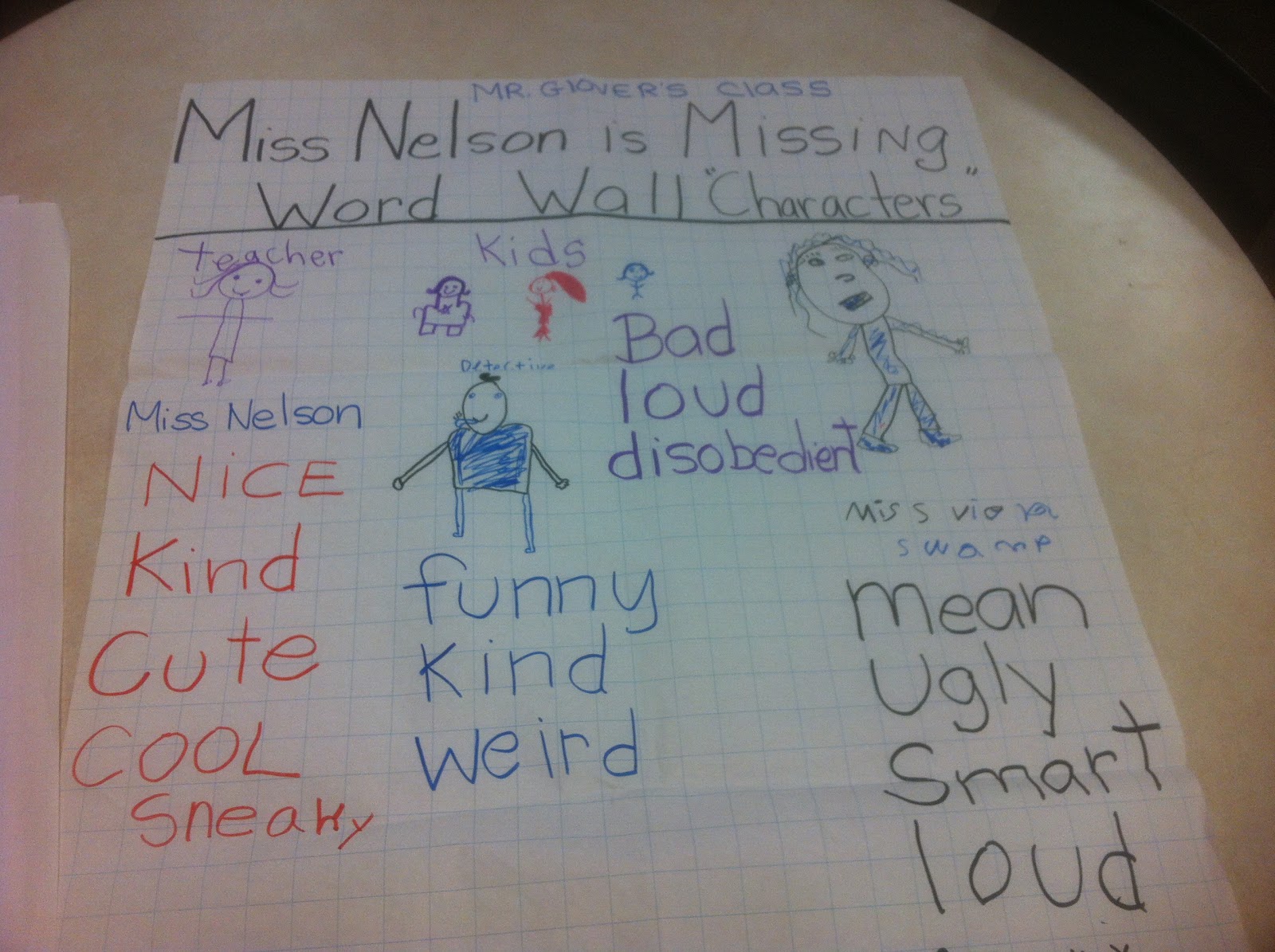
This is the "Word Wall" poster of one of the Second Grade classes.   They drew the characters and listed the words to describe them.

We worked on a round table and had a lot of fun.  The giggling got stronger when we got to Ms. Viola Swamp.  :D

(Click on the photo for a closer look)


Monday, October 15, 2012

Thing 1: Blogging

Hello All!

I am so glad to be back to blogging.   I kind of missed it but never seem to have time to write.  The Cool Tools PD is a great "excuse" to get back to it.

Let's see, my name is Rosa and I have worked as a Children's Librarian in a public library, a reference librarian at a college and currently a school media specialist at Lincoln Park School 44 in Rochester.  I absolutely love reading to children.  It is so much fun to see their reactions when different things happen in the stories.  Today we made a "word wall" of Miss Nelson is Missing and the second graders drew pictures of the characters along with the words.  (Will put up a photo later).

I decided to take this PD because this is my first year as a librarian-teacher.  I want to be better equipped to teach fun technology to my students.  In the beginning I was focusing a lot on making copies and having the students work on worksheets.   (How they whined and protested).  However, I realized that the school library should be a fun place where you can check out books and learn how to be tech savvy.  With this in mind, I hope to incorporate all the fun things we will be working on in this program.


Monday, December 5, 2011

Podcasting at the Media Center

As a librarian it is exciting to find different ways of engaging students and making learning fun.  When I worked at the public library, we always had different themes for every month.  One of the themes celebrated during the month of March is Women's History.  And although we can use print and electronic resources to teach about women's history, using podcasts can really captivate the students' attention. 
This is one of the reasons I like NPR.  It has a variety of good podcasts and I particularly like the Tell Me More About Women's History collection.  This collection of podcasts tell about the lives of influential women in history and the significance of their accomplishments.
I would definitely use this collection of podcasts to enhance a month long celebration of women's accomplishments in history.  I would also have the students build on these podcasts by creating podcasts of their own, about other historical women.

Sunday, November 20, 2011

Going Global With ePals


While navigating through the ePals  website, I kept thinking about global collaboration. 
This resource gives a new meaning to the term "pen pals".  In our technologically fueled world this FREE resource puts similar minds together, even while countries apart.   And while ePals offers many opportunities for collaboration, I found an useful feature for learning about cultural differences.
 
The feature I found most useful was "Choose a project.  Find a classroom.  Collaborate!" It was wonderful to see how students can work together and learn from each other.  There are many countries to select and the ideas for projects are very interesting.  One particular project idea I liked was "why do we celebrate?".  This project is a fantastic resource for teaching about cultures and foreign languages.  With this project students can find out first hand about a cultural celebration by asking a student from another country.  

As a librarian, this feature would be beneficial to assist students while they are learning about different countries.  I would also take it a step further and integrate an ePals project with a class to bring awareness to multiculturalism.  Having students establish communication and collaborating on online projects can enhance their technology skills and prepare them for working with more Web 2.0 tools.

Monday, November 14, 2011

More Digital Stories


Make a video of your own at Animoto.
 
In a previous post I discussed the many ways digital storytelling can be used in the classroom.  Using digital storytelling is a great way to have your students acquire and use technology skills, practice on their writing and be creative.  Web tools for digital storytelling include Animoto, Slideroll and Stupeflix.  All of these sites are great for creating short stories with music, photos, and text.

There are many ways of using digital storytelling for teaching.  Students in English class could re-enact scenes from a book and arrange them as a short story.  (An activity such as this one would demonstrate their comprehension of the material being read in class).  Include Poetry in your slides along relevant images to increase understanding of the writer's work.  And instead of writing assignments, encourage the students to use digital storytelling when writing essays on vacations and class trips.

Include the students' ideas in what they would like to create with digital storytelling.  Have them brainstorm in groups and create a "storyboard" for their project.  If you are teaching History include photos from your travels and discuss the sights with your students.

Using digital stories in the classroom can open a whole new world for many students.  Here teachers have the opportunity to bring cities and countries the students have never visited.  It is a creative way of starting great discussions with your students.  I guarantee they will love using these digital storytelling tools.

Monday, November 7, 2011

The Art of Digital Storytelling II


The story that I created above included my own photos from a trip to Maplewood Park in Rochester, New York.  I love roses of all colors and this Summer the park had an abundance of pink ones.  While at the park I was lucky to observe other things that made that day very special. 

Using Web tools (Bookr) like the one I used to create the digital book above is useful for interpreting books, creating journal entries, personal stories, basic research projects and just plain fun stories.
Students can be encouraged to create stories that are relevant to them, but I also would use this Web tool for enhancing learning in the classroom. 

Ideas and Objectives:

  • Create digital stories of summaries of books through photos.  Students can "dress up" and photograph pivotal scenes from a book for interpretation. (Objective: Students will achieve comprehension and understanding of plots in a book or story). 
  • Create personal stories through uploaded photos.  Students can create a book about their sport seasons, award ceremonies, or significant celebrations in their life using writing and photos.  (Objective:  Students will increase their writing and technology skills). 
  • Create research projects with text and image. For example:  Art students can summarize the works of an artist by creating a digital book about the artist's works.  (Objective:  Students will increase their critical thinking skills in adding relevant content to their presentations for Art, Biology, History, Languages, etc.).

There are many ways of using digital books in the classroom.  Bookr provides a digital book making site that students can use to create a digital story that can be fun, educational and meaningful as well.

The Art of Digital Storytelling

         Creative Commons Attribution-Share Alike 2.0 Generic License                                                 


 Creating stories digitally is a great way of expressing one's creativity.  Everything we see today can be recreated or enhance through digital means.  I recently saw an online photo that had been enhanced with digital coloring.  The effects made the Fall foliage of the trees seem brighter and almost surreal.  The ending result was an image super enhanced by the imagination and emotion of the photographer. 

The same can be said of digital storytelling.  It is "a short, first person video-narrative created by combining recorded voice, still and moving images, and music or other sounds".  Using digital storytelling can be entertaining and creative but it also involves an emotional component.  My digital stories often involve stories of my family.  I've included events and celebrations that have wonderful memories attached.  However, the ideas for creating digital stories are not limited to personal events.  One can create historical time lines and explore significant events in history through the use of digital storytelling.

Historical time lines can become more real and meaningful when enhanced with digital content.  Historical events such as September 11th, the Civil Rights Movement and the Challenger Space missions were captured by the University of Houston's Educational Uses of Digital Storytelling presentation.  These images combined with audio and sound go beyond the traditional television newscast.  According to the narrator, "in the school setting, students can create their own time machine".  What an incredible learning opportunity!  To be able to explore and/or create historical events through images, audio and narration.  This is a definite attraction for technically and non-technically inclined students. 

However, as with anything created online, there has to be education concerning copyright issues and trademarks.  "Students should be aware of obtaining permission for materials obtained from someone else.  And should also give proper credit to the author of those materials used".
It is also important to note, that students should be aware of what types of personal information is shared when creating digital stories.  The cautionary tale of what goes on the Internet, stays on the Internet forever rings very true in this aspect.
All in all, Digital Storytelling as a Web tool is an outstanding way in which students can learn and express their creative styles.  

Friday, October 14, 2011

My Re-Introduction to the World of Twitter

When I first began to use Twitter, it was to "keep up" with organizations that were of interest to me.  I seldom used it and did not know the many ways in which Twitter could be used educationally. Clearly there is more to Twitter than meets the eye.  And I just found many great ways of putting Twitter to use within the classroom setting and beyond. 
The amount of people who use Twitter grows more and more each day.  Fortunately for me, many educators are finding original and interesting ways of integrating micro-blogging in the classroom.  28 Creative Ways Teachers Are Using Twitter has great ideas for educators interested in combining Twitter and the classroom.  
 
Some of the ideas were the following:

  • Having students Tweet instead of raising their hands in class.  This could help students with disability issues.  It can also help students have the confidence to participate in class.

  • Twitter can be used by educators to give class announcements.  (If the professor is late, there is a class visitor or changes in the class schedule.  All of these topics can be announced via Twitter).

  • Students can notify their teachers about their completed assignments.

  • Preschool teachers can keep parents involved in their child's day by Tweeting daily activities.

And while the list goes on I thought of other ways to use Twitter in the educational setting.  My ideas were:

  • PTA meetings could be summarized and Tweeted to parents who could not attend meetings.  

  • Principals could Tweet positive activities going on live at their schools (we are always focusing on negative student behavior)

  • Teachers could Tweet vocabulary words to their students relevant to what they are learning and students could Tweet full sentences back, using the vocabulary words.  

There is so much possibilities for learning with Twitter.  And one is never to old to learn something new.
Take me for example.  As I mentioned before, I am fairly new to Twitter so it was interesting for me to read What is a Hashtag? 

This article "schooled" me on how to use the famous # sign.  Needless to say I put the Hashtag to use while searching on Twitter and had a better success on my results.  I still have not used it on a Tweet, but I am planning to use it while at a conference.  Wish me luck!


Monday, October 3, 2011

Classroom 2.0

The social networking group that would definitely be useful to me is Classroom 2.0.  It has so many resources and helpful tips for everything technology wise in the classroom.  The site combines Web 2.0 resources with teacher know-how.  You can find everything from support for new teachers, lesson plan ideas, ways of using Google Earth in the classroom to supportive links of other educational networking groups.  I will be reading and researching the support resources offered to new teachers.  Through Classroom 2.0, I have already found a social networking group for librarians.  Hooray!

Connecting Others to The World

One of our goals as educators is to share knowledge and help students develop critical thinking minds.  We also want our students to grow and expand their knowledge of the world we live in.  Consider the following  analogy, teachers are like radio towers and students are the radio stations.  And what do radio towers provide? Radio towers provide radio stations with the power to be connected to the world.  However the only way we can provide a good connection to our students is by staying current and relevant in today's digital world.  The importance of continual learning was reiterated again by George Siemens' Connectivism: A Learning Theory for the Digital Age.

I liked Siemens' concept that "learning is a continual process, lasting for a lifetime".  And as educators it is our responsibility to remain connected to the digital world through education.  No longer can we use the excuse of schedules and location because online classes and work related experience credit offer alternative ways to "attend class".   The nature of knowledge is changing and the way of obtaining that knowledge is changing too.  According to Siemens, "the average individual has to continue to stay current over a course of a lifetime".   Imagine that!  A lifetime of learning.  In other words, a teacher's education should not end with a teacher's certificate or a master's degree.  It should continue (with emphasis on the word "continue") to grow, in order to provide students and fellow educators fresh and new ideas.

Monday, September 26, 2011

Resourceful Website Helps Educators Stay Connected

When I read Steven W. Anderson's post on the blog, Blogging About The Web 2.0 Connected Classroom, I thought he had read my mind.  His post, Find New Resources For Your Classroom With eduTecher gives information about a great online resource that educators can use.  As educators we are always trying to find new information for our students and ways to use technology.  However, we don't always have the time to sit searching through the numerous websites that offer such information.

Enter the website eduTecher.  This website contains a generous amount of technology resources, educational links and even tutorial videos for teachers.  The resources are free and can be used by anyone.  The eduTecher site contains so much information, it has filters such as grades and subject.  I plan to spend some quality time exploring this exciting website.